











 285
285
Messenger or Customer relationship management: which to choose and when to use a CRM system
Most companies begin communicating with clients through messaging apps—it's convenient, fast, and practically free. Viber, WhatsApp, and other apps make it easy to establish communication: answer questions, send documents, and arrange meetings.
But as businesses grow, it becomes clear that chat apps are no longer sufficient, and advanced features like the WhatsApp Business API often require additional costs or intermediaries. Conversations are lost, deals are not tracked, and customer interaction histories are scattered across disparate chats. There comes a point when a CRM is essential.
In this article we will look into:
- Why messengers are good at the start;
- What are their limitations when scaling?
- Why do you need a CRM system?
- and how to integrate chats with CRM into a single system to maintain flexibility while maintaining process control.


Why do people choose messengers at the start?
For small businesses and startups, messaging apps are a logical choice. They require no investment, are familiar to users, and allow them to "just get started."
The advantages are obvious:
- efficiency - you can quickly respond to requests;
- Simplicity - no need to train the team to work with a new system;
- flexibility - a smartphone is enough to handle all correspondence.
WhatsApp, Viber, Telegram: Basic functions that help
Popular instant messengers offer minimal but useful functionality:
- Tags and folders - some messengers have basic sorting tools (for example, folders in Telegram), while WhatsApp and Viber do not have such functions.
- Pinned messages and templates - save time on recurring requests;
- Integrations via bots – in Telegram, you can automate the collection of requests and responses to common questions; in WhatsApp and Viber, such solutions are limited in availability and often require paid services or intermediaries.
At the start, this is enough, especially with a small flow of requests.
Messenger Limitations: When They Slow Down Processes
As the customer base grows, chats begin to lose their effectiveness. The main problems are:
- there is no centralized history of interactions;
- it is difficult to analyze the effectiveness of sales and employees;
- It's impossible to effectively organize teamwork: access to chats is shared, and correspondence is easily lost.
As a result, businesses lose control over communications and need a tool that restores structure and transparency.

Messenger or CRM: Which is More Effective for Business?
Live chat is a fast and familiar way to communicate , but it's limited to text messaging. When you need to build a sales funnel, analyze channels, and coordinate teamwork, the need for a CRM becomes clear. Such a system covers the entire user journey: from the first contact to closing a deal, including analytics, planning, task tracking, and integration with other tools.
Simply put, CRM is not just about messages, but about managing the entire customer history and the business processes around it.
Advantages of CRM over instant messengers
When a business grows beyond five leads and one manager, the benefits of a customer management system become clear:
- Complete client history - everything in one place: requests, calls, letters, comments;
- Transaction control - you can see what stage each application is at, who is responsible for it, and where there are delays;
- One-click analytics – you can evaluate which channels generate leads and which managers are most effective;
- Separation of rights and areas of responsibility - the manager manages, employees do not intersect;
- Integrations – the system connects to the website, messengers, telephony, accounting, and other services.
And most importantly, a single communications center creates order and control where previously there was only a flow of messages.
CRM not instead of messenger, but together with it
It's important not to oppose, but to integrate. Clients want to message wherever they're comfortable – Viber, Telegram, or WhatsApp. The CRM's job is to receive these messages, consolidate them into a single interface, and provide the manager with the full context: who wrote them, what stage the deal is at, and what happened before.
This way, businesses gain both chat speed and overall system control. It's not an "either-or" choice, but a "both-and" one – it's convenient for the client and transparent for the company.

When it's time to connect a CRM: signals you can't ignore
Chaos in chats, lost leads, and other warning signs
There are plenty of messaging apps out there at the start. But if you're increasingly encountering situations like:
- messages get lost and customers go unanswered;
- managers forget to call back or confuse tasks;
- the history of correspondence is scattered across phones and messengers;
- clients communicate with different employees, and no one sees the full picture;
- the manager cannot answer: how many leads are currently active, in progress or failed;
- this means that businesses are no longer satisfied with just chats. It's time to move to a systemic approach.
When to connect a CRM system: in stages, taking into account growth
- Small businesses. If you have a small number of clients, messaging apps will do the job for now. But even at this stage, it's worth considering how you'll scale up to avoid having to put out fires later.
- The active growth stage. A steady flow of requests appears, and you hire new managers. Without a unified system, it's difficult here – leads will start to get lost and tasks will get mixed up. A system helps bring order and ensure nothing gets missed.
- Scaling the sales department. Multiple teams, branches, or partners are added. Without additional functionality, it's no longer possible to build analytics, assign roles, or create a transparent sales funnel. The business loses control – and with it, profits.

How to choose a CRM system for your business
Not by brand, but by objectives
When choosing a system, don't chase after big names. What's important is how well the system addresses your specific needs. Consider these basic, yet critical, parameters:
- Integrations - the platform should seamlessly connect with the website, telephony, mail, accounting, and other services;
- Mobility - it is important that managers can work from a browser, smartphone or PWA application;
- Analytics and reports - figures on sales, channel efficiency and employee workload - must be transparent;
- Flexibility - a good system adapts to business processes, rather than forcing them to change to suit itself.
The right customer management system isn't a "box," but a tool that grows with the company and adapts to its logic.
CRM + Messengers: A Must-Check
Since clients still message on WhatsApp, Telegram, and Viber, it's important that your corporate system be able to work with these channels. When choosing, consider:
- Is it possible to connect instant messengers directly?
- Is it convenient to conduct correspondence directly from the system, without switching between windows?
- Is the message history saved in the client card?
- Are auto-replies, templates and scripts supported?
This approach delivers maximum benefits: customers communicate in a familiar format, and managers work within a system that includes accounting, analytics, and automation. We discussed this in more detail in our article on the advantages of chat-oriented platforms.
CRM Integration with Messengers: How to Get the Most Out of It
AvaCRM: A Chat-Based System for Business
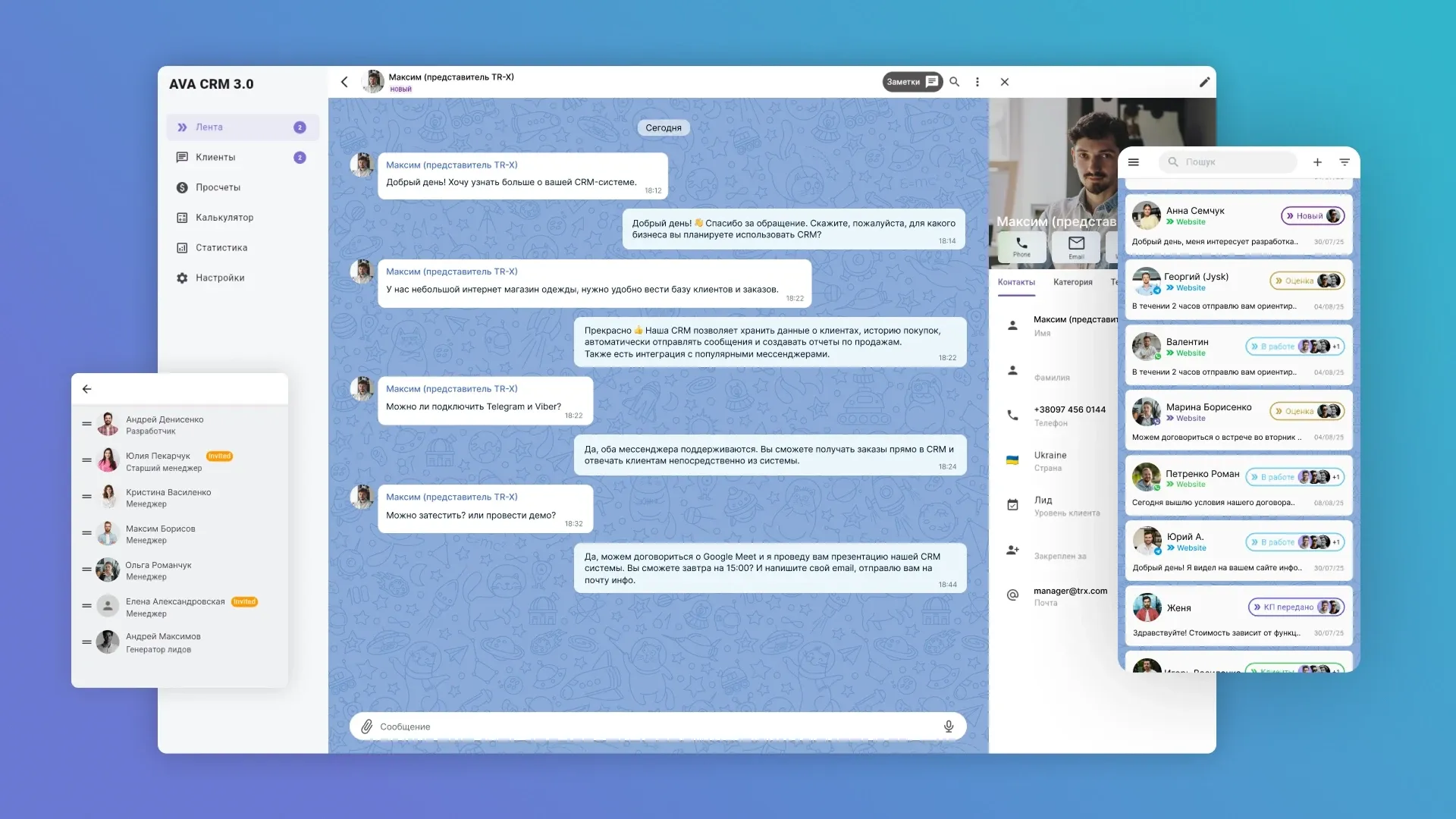
Many companies aren't ready to give up chat apps – and that's logical. Clients find it more convenient to message on Telegram or Viber than to fill out a form on a website. We took this into account when developing AvaCRM, our proprietary customer management system focused on messaging and live interaction.
In AvaCRM, messaging apps aren't eliminated, but rather become part of the overall system. The manager responds to the client in the usual format: writing messages, forwarding files, and clarifying details. But at the same time:
- the entire dialogue is saved in the client’s card;
- you can set a task, record an agreement, mark a stage of the transaction;
- Not a single request is “lost” - it becomes part of the overall funnel.
Why does a business need an omnichannel system?
Chat integration isn't just a convenience. It's a step toward an omnichannel model, where all interactions are collected in a single system:
- A single chat hub – correspondence from all messengers in one window;
- sales funnel - requests are immediately converted into deals with stages and statuses;
- Analytics - you can see where your leads come from and which managers are closing the most deals;
- reports - the manager sees the big picture and can manage based on data.
This approach combines the best of both worlds:
- convenience of chats for the client
- manageability and transparency for business.
AvaCRM is an example of a system that helps you grow without losing quality of service.


Conclusion
Messengers are a great start. They help establish rapport, quickly respond to inquiries, and initiate initial sales. But as your business grows, it becomes clear that chat alone is no longer enough. Without a unified customer management system, it's difficult to control processes, manage your team, see the big picture, and scale your business. Chaos, duplicate tasks, and lost leads arise.
The best solution isn't "CRM instead of messenger," but a combination of CRM and messengers. This approach maintains customer convenience and provides the business with all the necessary infrastructure – deals, tasks, analytics, and reports. This is precisely the principle behind AvaCRM – a chat-based system where all communication and management takes place in a single window.
If you're looking for a reliable solution and don't know how to choose the right CRM for your business, we'll help you figure it out and find the best option. And if standard systems don't cover your processes, we'll develop a custom CRM tailored to your company's goals.
Contact us to discuss your project and receive advice on the first steps.


FAQ
-
Is it possible to conduct business only through instant messengers?
It's possible at the start. But as clients grow, requests will start to get lost, control will become more complex, and service quality will decline. Messengers are a good first step, but not a sustainable strategy.
-
How much does a CRM with chats and integrations cost?
It depends on the tasks. Basic solutions can be inexpensive, but if you need to connect to a website, ERP, accounting, or custom processes, it's better to budget for custom development right away.
-
What happens if you connect CRM too late?
The risks are significant: customer loss, manager chaos, and a lack of analytics. This hinders growth and reduces conversion at every stage of the funnel.
-
Is it possible to transfer history from Telegram or WhatsApp to CRM?
There's no official way to transfer your entire chat history to your CRM. Integrations allow you to save new messages directly to your client profile. Old conversations can be manually downloaded and attached (this applies to Telegram), while in WhatsApp, the history remains only in the app, while all new inquiries are collected in your CRM.
-
Why does a small business need a CRM system?
To build a systematic approach to customer service from the very beginning. Even with a small influx of requests, CRM helps you maintain contacts, view communication history, distribute tasks among employees, and understand which channels are most effective. This creates the foundation for growth without chaos or service disruptions.

