








AvaCRM
Solutions
The best self hosted CRM (like a chat 💬)
Critical success factors for any modern business are speed of response, personalization and multi-channel interaction. Therefore, companies increasingly need not just a CRM, but a tool that can be organically integrated into live communication flows. We have developed a system that combines the interface of a messenger with the functionality of a modern CRM, works equally effectively on mobile and desktop devices, and runs directly in the browser. Chat-oriented CRM AvaCRM is a tool for organic communication and business process management in a familiar and convenient format.
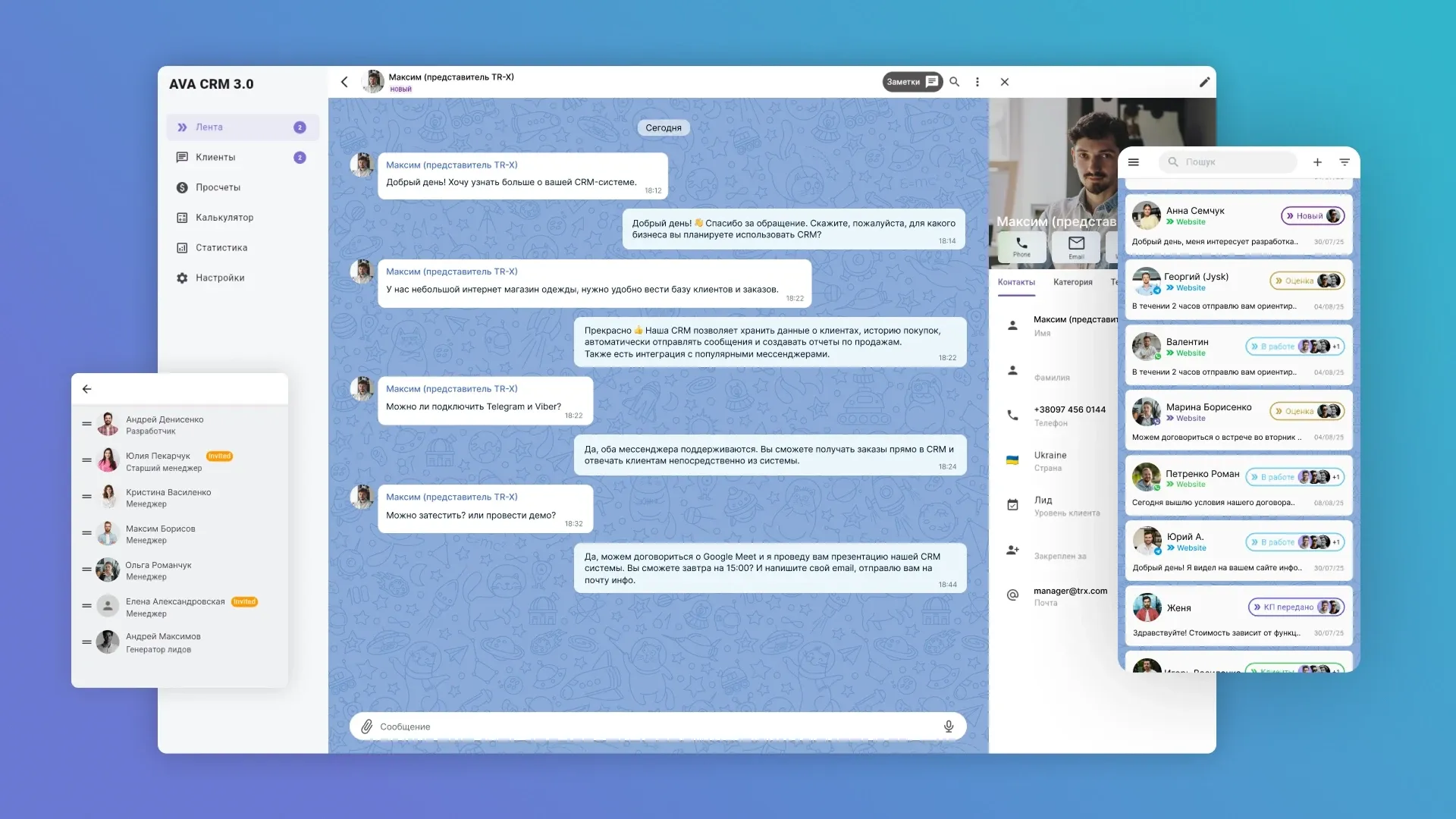
Chat-first approach: what makes AvaCRM a unique management system
AvaCRM is a progressive B2B application from AvadaCRM in the form of a messenger that changes the approach to managing medium and small businesses, providing exceptional efficiency and deep analytics. First of all, the solution eliminates data fragmentation and increases the efficiency of your team, providing a single point of control over all client interactions. Unlike traditional chat-oriented CRMs, AvaCRM establishes interaction with the client in the most natural and familiar format. The clear interface allows you to quickly configure the system and start working.
The main feature of AvaCRM is a messenger interface instead of the tabular structure of traditional CRM. Here, all the logic of communication and data exchange is deployed in a convenient and intuitive chat format.
- On mobile devices, chat CRM has a clear and concise interface: the user sees a list of dialogues and client statuses, gets quick access to the history of correspondence and attachments. And managers can respond faster, work without errors and focus on the dialogue with the client.
- On desktops, the messenger CRM interface retains the same principles: a focus on communication, minimalism, logical division of blocks and easy switching between functions. This approach eliminates the visual and logical gap between platforms: employees can start a dialogue on a computer and continue it on the phone – and vice versa.

AvaCRM capabilities
Our AvaCRM business solution is not just a messenger. Full-fledged CRM functionality makes the system a universal tool for sales, support and marketing.
1. Communication Management Center
The main chat-CRM workspace, where all interactions with customers take place, is not just a list of dialogs, but a full-fledged communications center, where contacts, messages and tasks are presented in a convenient, dynamic form. The section includes the following functional elements.
1.1. Chat List
The lead feed provides instant access to all current and completed dialogs, showing:
- client name;
- client status in CRM;
- preview of the last message;
- priority and source of the appeal.
Each dialog opens in a messenger format with a full message history. Chat CRM for small businesses also supports the transfer of documents, media files and voice messages.
The Feed features filtering and search by category, status, and date – this allows you to quickly find the desired conversation and effectively manage the incoming message flow. You can quickly make a call, switch to other communication channels, for example, from Telegram to WhatsApp. This reduces the number of switching between tools and speeds up the processing of requests.
1.2. Real-time analytics
In the Statistics section, you can see the number of new and current conversations for the selected period, monitor the workload on employees, and quickly respond to changing situations.


1.3. Management of the contact database
The Contacts tab is a complete customer database with filtering, tagging, and interaction history. You can combine data from different channels into a single profile, add new contacts, and manually edit information.
1.4. Flexible interaction settings
- In the Settings section, there is a comprehensive set of tools for fine-tuning channels, services, user roles, and team work scenarios. This allows you to fully adapt CRM in chat format to your operational requirements.
- In System Settings – choose the theme, language and time zone for your chat window. This is important to ensure that support is available at the optimal time for your audience.
2. Intelligent automation
AvaCRM allows you to implement chatbots and AI agents to process typical requests, automatically assign tags or route dialogues, significantly reducing the load on operators.
3. User role settings
Building a team structure, delimiting access and roles for each employee in Settings provides control and security when working with the client base.
4. Integration and Scalability
Our CRM system for small businesses in the messenger format is flexible and scalable, for centralized processing of customer requests it easily integrates with messengers (WhatsApp, Telegram, Instagram Direct, Viber, Facebook Messenger) and the website, as well as with ERP, payment systems and eCommerce platforms – when building end-to-end processes. The program is adapted to a large number of requests, dialogues, customers, etc. The architecture allows you to expand the number of users, departments, channels. API support makes it possible to implement custom integrations specific to your industry.

How messenger-oriented CRM AvaCRM works
Our CRM chat is created in the PWA (Progressive Web App) format – this technology combines the advantages of a website and a mobile application. What this means for users:
- 24/7 access from any device – AvaCRM does not require installation and provides instant access from any modern browser on a mobile and desktop device. At the same time, the performance and interface remain equally convenient and responsive;
- high loading speed – the system starts quickly and responds to user actions;
- modular architecture and the presence of API in the CRM chat allow you to flexibly configure the system for your tasks;
- combining all communication channels (Telegram, WhatsApp, Viber, Instagram, Email) into one clear and convenient feed without switching between platforms forms a full-fledged omnichannel sales funnel. Moreover, the system supports working with multiple accounts of the same messenger.
- real-time notifications – managers immediately see new requests and events without the need to refresh the page.
Chat-oriented CRM in PWA format is convenient, modern, and cost-effective, especially for businesses that value mobility and flexibility.


Custom chat CRM development
In conditions of high load, each request must be processed quickly, in context and without data loss. Our chat-CRM will become a single center for managing communications and business processes. AvaCRM already includes all the necessary functionality for automation, effective work with messengers, deal management and analytics. Messenger-oriented CRM for medium and small businesses is quickly implemented and adapted to business. This allows your company to quickly start working and evaluate efficiency in the first days, and technical support and updates from our team will ensure the relevance and stability of the system.
If you have specific requirements or want to get a unique and fully adapted to the specifics of your business chat-oriented CRM system, our team is ready to create a custom solution, building the architecture, functionality and integrations for your scenarios from scratch. We develop the best CRM systems for small businesses, guarantee transparent terms of cooperation, fixed terms and competitive prices. A professional approach and support at all stages of implementation ensure a successful start and long-term results.
Contact us to discuss your needs and start automating your processes today.


FAQ
-
How much does it cost to implement a chat-oriented CRM?
The cost of implementing a CRM in a messenger format depends on the chosen collaboration format, the scope of required customizations and integrations, the number of users, and the complexity of business processes. Based on your needs and budget, we will offer the optimal chat CRM format and price – either adapting a ready-made solution or custom development.
-
How long does it take to develop a custom messenger-oriented CRM for a medium-sized business?
Custom chat CRM development takes from 3 months and depends on the scope of requirements, integrations, and approvals. Adaptation and implementation of the finished product are completed as quickly as possible.
-
How is a chat-oriented interface better than traditional CRM?
A chat-oriented CRM enables natural and intuitive communication with clients in a familiar messenger format. This reduces the onboarding threshold, speeds up request processing, and unifies communications from multiple channels in a single window.
-
Is it possible to switch between messengers within a single chat?
Yes, AvaCRM integrates all corporate communication channels into a single window, simplifying communication, eliminating duplication, and significantly increasing the speed of managers' work.
-
How does the system help monitor service quality and agent performance?
AvaCRM has built-in analytics tools, including monitoring, the number of requests processed, and internal metrics that allow you to evaluate the performance of each employee.
-
Is it possible to integrate AvaCRM with external business systems?
Thanks to our API, our chat CRM is ready to integrate with ERP, accounting software, marketing platforms, and other services to create a unified business management ecosystem. We also offer custom ERP and other software development for businesses of any size and type.