











 1760
1760
The furniture business is one of the most demanding when it comes to customer communication. Customers want to see what their cabinets or kitchen will look like, want to know the approximate cost right now, not "after measurements," and definitely don't want to explain the same thing to three different managers.
In practice, the path from the first visit to the site to the completed order usually looks like this:
- the client leaves a request through the form on the website;
- the manager calls back and clarifies the dimensions and materials;
- manually calculates the cost;
- sends the calculation by mail;
- the client disappears for a week;
- the manager calls back again;
- and everything starts over again.
Or it doesn't start because the client has already gone to a competitor whose website allowed them to assemble the product and immediately get the price.
At AvadaCRM, we regularly see the same set of problems among furniture companies:
- Managers spend 60–70% of their time on initial communication — finding out exactly what the client wants, what sizes, what materials, what budget. This isn't sales; it's data collection, which can and should be automated.
- Requests arrive unqualified — in the standard feedback form, the client provides only their name and phone number. The manager has no information about the product the client is interested in, their size and material requirements, or their price range. All this information has to be gathered from scratch over the phone.
- Data gets lost between channels — a client might message in a website chat, then call, then message in a messenger. Each time, they start from scratch because their entire history isn't stored anywhere.
- There's no clarity for the client — they can't imagine what the finished product will look like until they see a 3D visualization. Without it, they're simply not ready to make a decision and put it off.
All this leads to long sales cycles, low conversion rates, and burnout among managers who are busy with routine tasks instead of sales.
We've built a solution that addresses these issues comprehensively: Online Furniture Configurator + AI Assistant + AvadaCRM.
Below, we'll show you how it works from a client's first visit to the site to a completed deal in the CRM with a completed card and correspondence history.

How the connection works: the customer's journey from the configurator to the deal in CRM
The general logic is as follows: the client goes through the entire process from product selection to order placement without the involvement of a manager. The manager then connects with the client, who has already prepared the task and the calculations.
Let's look at each stage.
Step 1: The client visits the website and opens the configurator
The furniture company's website features an interactive configurator where visitors can assemble a product to their specifications: select the type of furniture, dimensions, materials, fittings, and color schemes.
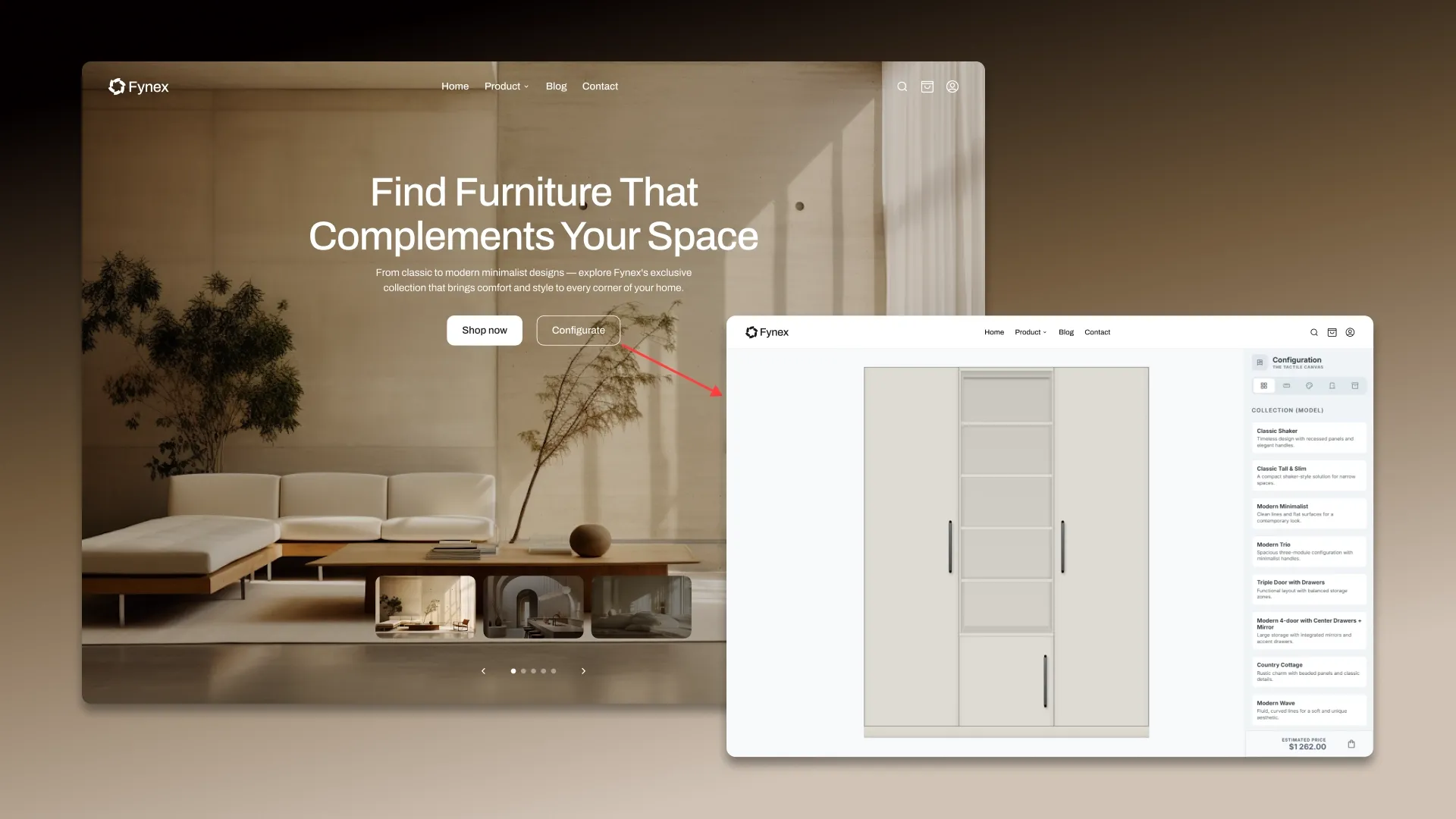
The configurator can work for different categories: kitchens, wardrobes, dressing rooms, shelving, upholstered furniture, bathroom furniture — any product that can be assembled from a set of parameters.
What the client sees:
- A visual interface with a product preview that updates in real time whenever parameters are changed.
- A preliminary cost that is recalculated automatically as you select options.
- Possibility to save the configuration or generate a PDF with calculation.
Important: The configurator is based on actual production data: current material prices, available size charts, and component compatibility.
The client cannot collect an impossible combination the system itself limits the choice to acceptable options.
Step 2: The AI assistant joins the conversation
Once the customer has assembled the product and clicks the "Generate PDF" or "Get Quote" button, an AI assistant is activated. It connects to the chat directly on the website, eliminating the need for the customer to navigate elsewhere or wait for a call.
What does the AI assistant do:
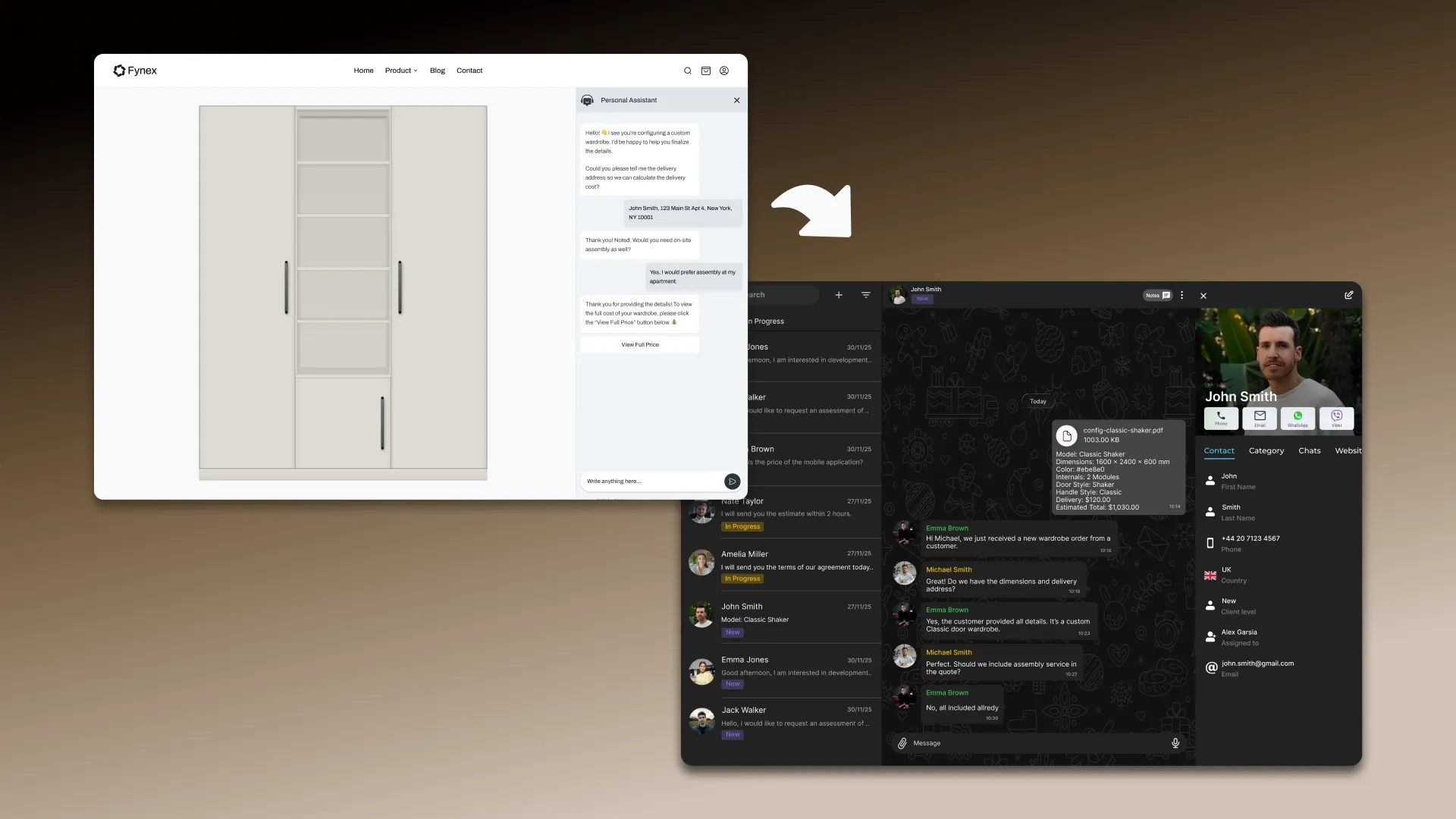
- Clarifies details not covered by the configurator. For example: "Please provide a delivery address so we can calculate the cost," "Is on-site assembly required?", "Are there any special features in the room, such as niches, overhangs, or sloped walls?"
- Answers customer questions. The assistant knows the catalog, production times, payment terms, and warranty terms. A customer can ask, "Can I get the same one, but 10 cm deeper?" or "What's the lead time if I order now?" and receive an immediate answer.
- Generates a structured request. All the information collected by the configurator, plus data from the client's dialogue name, contact information, address, and any additional requests is packaged into a clear, structured request.
The AI assistant conducts a live dialogue, understands context, remembers what the client selected in the configurator, and asks only those questions whose answers are truly necessary for placing an order.


Step 3. Data is automatically transferred to AvadaCRM
Once the AI assistant completes the conversation and collects all the data, the request is automatically transferred to AvadaCRM. The manager doesn't need to manually transfer anything everything happens automatically.
What is created in CRM:
- A new deal —with the product name, configuration, price, and status is created. The deal is placed at the appropriate stage of the sales funnel.
- A completed client card includes the client's name, phone number, email address, delivery address, and any other information provided in the correspondence. The manager doesn't need to manually create the contact information.
- All client correspondence with the AI assistant is attached to the deal. The manager sees the full context: what the client selected, what questions they asked, what clarifications were made. There's no need to call and ask again, "What did you want?"
- Files from the configurator — PDF with calculations, product visualizations are all attached to the transaction and available with one click.
AvadaCRM is a chat-based CRM, so all client communications are displayed in a familiar messenger format. Managers can continue the conversation directly in the system, without switching between tabs and channels.

Step 4. The manager connects to the prepared client
This is where the manager's work begins - but this is no longer a "cold" call asking "what did you want?"
The manager receives:
- a client who has already chosen a product and seen the visualization;
- configuration with cost calculation;
- a correspondence history that makes clear the needs, budget and deadlines;
- contact information filled in by the client himself.
The manager only gets involved at the final, crucial stage: confirming the order, agreeing on final details, and discussing payment and delivery. And if the manager sees that the client has selected a configuration but hasn't completed the checkout, they can initiate contact themselves all the necessary information is already in the transaction card.

What does this mean for the furniture business?
This bundle solves the problems we talked about at the beginning, and here are the changes it brings:
Managers focus on sales, not data collection. All qualifications what the client wants, what the budget is, and what the dimensions are handled by the configurator and AI assistant. The manager receives a qualified lead and works to close the deal.
Conversion rates increase because customers don't wait. They visit the website, assemble the furniture, get a quote, ask questions, and submit a request all in one visit. There's no "we'll call you back" pause, which can cause 30–50% of leads to be lost.
Not a single lead is lost. Every conversation is recorded, and every request is automatically entered into the CRM. No forgotten chat messages, no lost sticky notes.
The customer receives a premium experience. Product visualization, instant payment, and a live AI assistant available 24/7 all of this creates the impression of a technologically advanced, modern company. This is especially important for furniture in the mid- and high-end price segments.
The transaction cycle is shortened. What used to take a week (application → call → quote → approval → repeat quote) now takes place in one or two iterations.
How can this be implemented?
The bundle consists of three components, each of which can be customized for a specific business:
The configurator is developed specifically for the company's product range and price lists. It can be integrated into an existing website or run as a standalone module. Calculation formulas, material lists, and visual models are all tailored to the actual production environment. The development of a furniture configurator can be entrusted to a team with specialized expertise - learn more here.
The AI assistant is configured to use the company's knowledge base: catalog, terms of service, and frequently asked questions. It can work on the website, in messengers, or across multiple channels simultaneously. You can view examples of AI assistant implementation and submit a request at this link.
AvadaCRM is a chat-based CRM that integrates all communication channels, deals, tasks, and analytics into a single interface. The system is deployed on the company's servers (self-hosted) and customized to fit existing business processes.
All three components integrate seamlessly, ensuring a seamless data flow from the first click to the closed transaction.
Want to learn how AvadaCRM, the configurator, and the AI assistant can work for your business? Submit a request — we'll get in touch, discuss your needs, and offer a customized implementation plan tailored to your specific needs.


